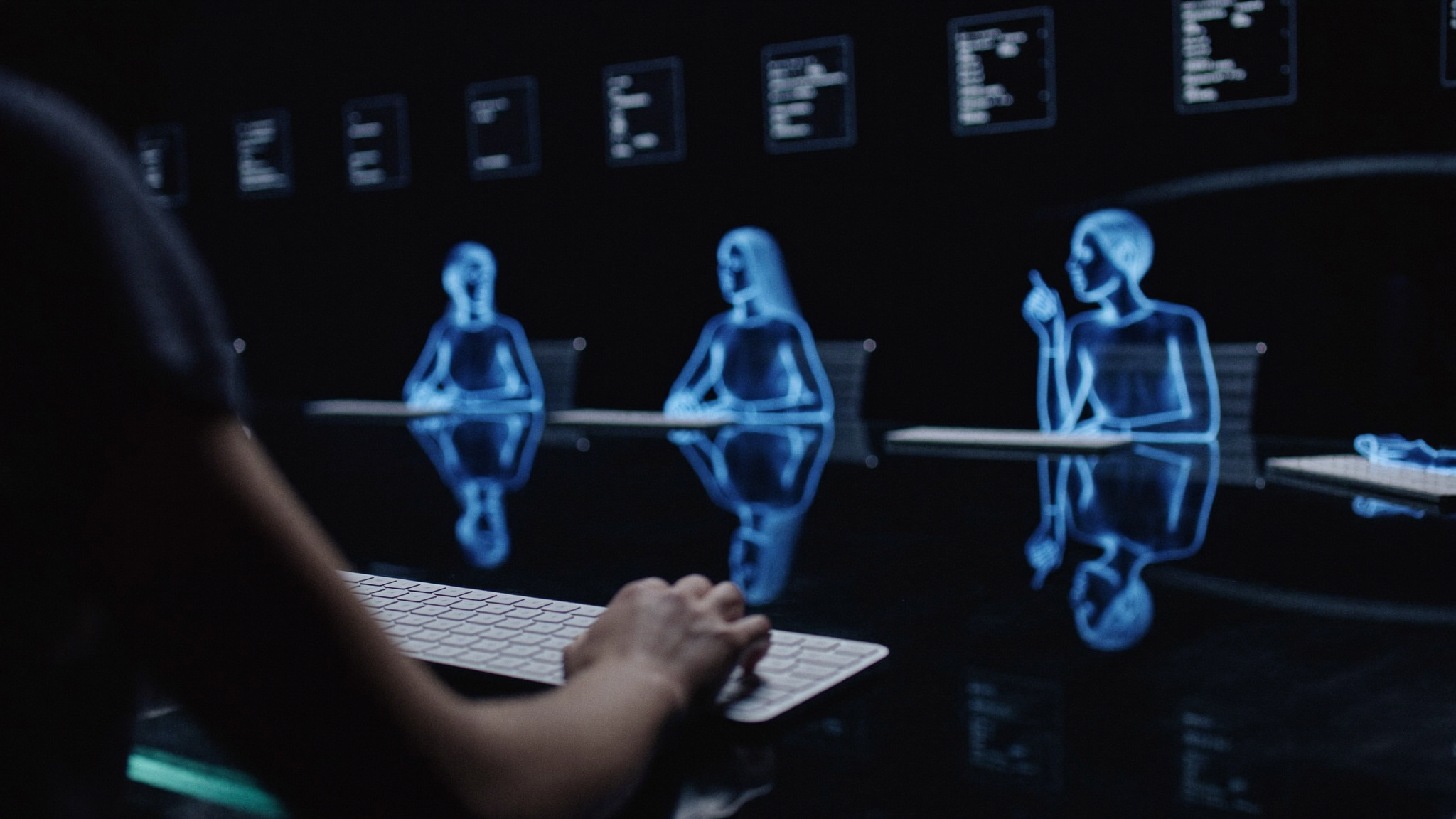



Windows
Windows 10/11 (64-bit)
Download for WindowsSHA-256 · select to copy
Windows install steps 06230e23c8adbbc7f2702fb62fad7b7d44aab8edae6b6ee9b43badf69c0170aeO2 Board Room · Available on Microsoft Store
Ask once — let your AI board discuss, delegate, and build together. One Opt!m Omega plan gives you access to Omega Mode.
Other download options · macOS, Linux & standalone WindowsOne table, many minds
Seat ChatGPT, Claude, Gemini, Grok, DeepSeek, Mistral, Llama, Perplexity, Kimi and other supported models in a single meeting, each seeing the same agenda. Available models depend on the connection mode and provider.
No keys. No juggling accounts.
Omega Mode runs supported AI models on Opt!m Omega's provider access, metered against your plan. You never paste an API key. Supported provider sign-ins are optional and use those accounts' limits. Chair-led managed meetings, round tables, brainstorms, or focused solo sessions keep the floor organized, and the minutes export to Markdown.
Coders that actually build
Code-writer seats narrate what they're doing and create real files on your machine — inside folders and permissions you explicitly grant, with a live activity feed. Meetings, projects, and memory stay on your computer with automatic backups. Cloud AI requests send relevant meeting context to the selected provider.
What it does
Board Room gives the models structure: a chair that directs, code writers that can create files, and a transcript you can save and export.
Bring ChatGPT, Claude, Gemini, Grok, DeepSeek, Mistral, Llama, Perplexity, Kimi and other supported models into one meeting, with a shared agenda and @mentions.
Omega Mode uses Opt!m Omega's provider access and your plan's allowance. Supported members can also use your own provider sign-in; those providers' plans and limits apply.
Code-writer seats narrate what they're doing and create real files on your machine — inside folders and permissions you explicitly grant, with a live activity feed.
Managed meetings with an AI chair, round tables, brainstorms, or focused solo sessions. Use parallel replies when you want members to work together. Minutes export to Markdown.
Generate images in the meeting, dictate prompts with your voice, attach photos and files the AIs can actually see.
Meeting history, projects, and settings are saved locally with launch-time backups. Cloud AI replies send your prompt and relevant context to the selected provider; its data policies apply.
Get Board Room
Recommended for Windows
Open the Store listing to install Board Room on your Windows PC. Once installed, sign in and choose your AI plan inside the app.
Free to install. An active plan is required to seat AI members.These are the standalone installers. For Windows, we recommend Microsoft Store above. Installation steps and checksums are included below.
First macOS/Linux release — if anything misbehaves, email us.
Windows 10/11 (64-bit)
Download for Windows06230e23c8adbbc7f2702fb62fad7b7d44aab8edae6b6ee9b43badf69c0170aemacOS 12 (Monterey) or later · Universal (Apple Silicon + Intel)
Download for macOSd163fe0fdaf1e4cdcb0c07d2c26d9ad56856455a9d78e323722fc9385eb2d7a3Linux x86_64 · AppImage (glibc 2.35+: Ubuntu 22.04+, Debian 12+, Fedora 36+, or newer)
Download for Linux424c7ec95e29bab7e6bc6c7e2105963bb366dc0bd60ecd757df05f788247dcebDebian/Ubuntu x86_64 · .deb · 101.6 MB
Download .debd36685a61c77f0e14a5e65331814bac3c78f9d1a2f51281e3376f7fee94ff328Standalone Windows installer signing status: Not digitally code-signed. SmartScreen may show an unrecognized-app warning, and Windows may list the publisher as Unknown.
Computer-control tools are Windows-only today. Meetings, Omega Mode, images, dictation, and coder workspaces work on all three platforms.
Windows lists the installed app as O2 Board Room. Back up important meetings before upgrading. An active plan is required to seat AI members; choose one inside the app.
The board can see your documents now. Attach a PDF and its pages — scanned pages, handwritten notes, charts and figures — are shown to the AI members as images (you just see one tidy chip), with any page viewable on demand; text inside images is read by on-device OCR, so nothing leaves your machine. The newest models joined the board: GPT-6 Sol, Claude Haiku 5.5, Gemini 3.7 Flash and Grok 4.6, each verified live before being offered. The app opens instantly — the board walks in to their seats while it gets the team ready (skippable) — drag-and-drop anywhere attaches and Enter sends, and everything from 2.29.0 (attach any file, nothing silently truncated) is included.
Before you install · Windows SmartScreen
The standalone Board Room 2.31.3 installer is not yet digitally code-signed. Windows has no verified publisher signature for this installer, and SmartScreen may treat a new download as unrecognized until it builds reputation.
An “unrecognized app” or “not commonly downloaded” warning is about that recognition check. The warning alone does not mean Windows detected malware. It also does not guarantee the app is free of problems. Continue only if you trust this download from anoptimtomorrow.com.
Microsoft's explanation of SmartScreenUse Download for Windows on this page. If Microsoft Edge says the file is not commonly downloaded, open its … menu → Keep → Show more → Keep anyway.
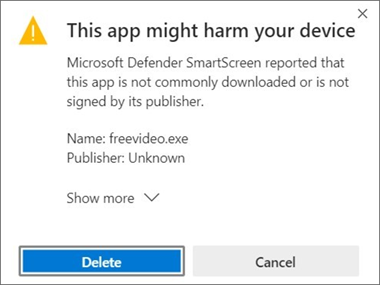
No download warning? Just open the downloaded file.
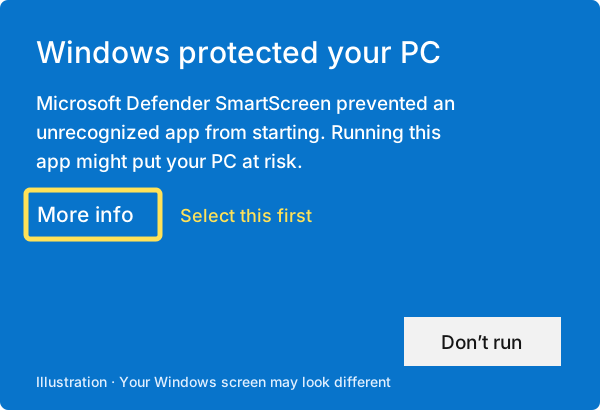
Open the downloaded Board Room Setup 2.31.3.exe file. If “Windows protected your PC” appears, select More info.
Check that the file is the Board Room installer you downloaded here, then select Run anyway. Allow the installer to finish; it installs automatically. Open O2 Board Room from Start or the desktop shortcut.
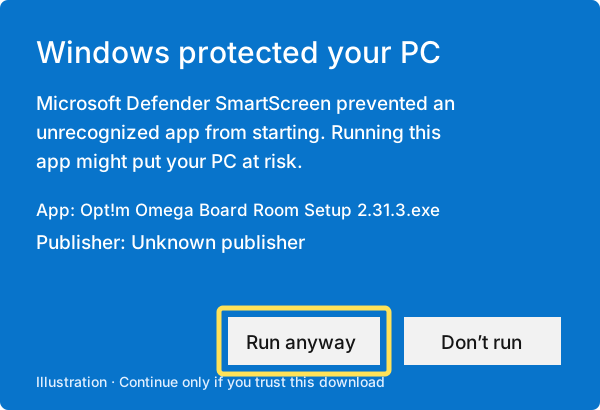
These steps apply to an unrecognized-app or uncommon-download warning. If security software reports a specific threat, stop and contact us. If Run anyway is missing, your Windows or work/school policy may block unsigned apps; contact your administrator or support. Keep Windows security protections enabled.
macOS · First launch
The app is not signed with a verified Apple developer identity and is not notarized; it carries only an ad-hoc signature. On first launch, macOS will block it because it cannot verify the developer. The message varies by macOS version.
That developer-verification warning reflects the missing publisher identity. The warning alone is not a malware detection. It is also not a guarantee of safety. Compare the downloaded file's SHA-256 with the checksum in the macOS card above to check you received the published file; a match does not establish that the app is safe.
Open Opt!m Omega Board Room 2.31.3 (macOS).dmg from your Downloads folder.
Drag the app from the DMG window into Applications, then open it from there.
After the blocked first launch, go to System Settings → Privacy & Security and click Open Anyway if you trust this download. Confirm when asked. On older macOS versions, right-click the app → Open also works.
In Terminal, run this from Downloads and compare the result with the macOS checksum above:
shasum -a256 "Opt!m Omega Board Room 2.31.3 (macOS).dmg"These steps apply to a developer-verification warning. If macOS or security software reports a specific threat, stop and contact support. Apple's guidance on apps from unknown developers.
Linux · AppImage or Debian package
This is the first Linux release. If anything misbehaves, email us with your distribution and the message you see.
Plans
Choose a plan in Settings → Billing & usage; sign-in and Stripe checkout open in your browser. Omega Mode usage is charged against the included AI allowance at model-dependent rates, with a weekly cap and a monthly budget. The weekly cap resets Monday at 00:00 UTC; unused weekly allowance does not roll over. Provider sign-in modes use your own provider account's limits instead. Cancel through the billing portal; access continues to the end of the paid period.
Privacy & security
Meeting history, projects, and settings are saved on your computer with automatic backups. Cloud AI replies require sending your prompt, relevant context, and any included attachments to the selected provider. Omega Mode also routes these requests through Opt!m Omega's service for access and metering. Review the data policies before sharing sensitive information. Details: Privacy Policy · Terms of Use · AI Acceptable Use Policy.
Questions
No API keys are required or accepted. Omega Mode uses your Opt!m Omega allowance without separate provider accounts. Supported sign-in modes can use an account you already have with a provider, including Sign in with ChatGPT for eligible accounts.
The app is free to install; an active Plus, Pro, Founder, or Max plan is required to seat AI members. Choose a plan in Settings → Billing & usage. Cancel through the billing portal; access continues to the end of the paid period.
Meeting history, projects, settings, and memory are saved on your computer with automatic backups. Cloud AI requests send your message and relevant meeting context to providers. Omega Mode routes those requests through Opt!m Omega's service for provider access and metering. See the Privacy Policy for data handling.
Computer-control tools that let members operate your computer are Windows-only today. Meetings, Omega Mode, images, dictation, and coder workspaces work on Windows, macOS, and Linux. Members can use enabled tools within the access you grant. Review permissions and allowed folders, follow the activity feed, and inspect generated files before using them.
For Windows, start with O2 Board Room on Microsoft Store using the main button on this page. For macOS, Linux, or a standalone Windows installer, open Other download options below the Store section.
The standalone Windows installer offered under Other download options is not yet digitally code-signed, so Windows has no verified publisher signature for that file. SmartScreen may warn that the download is uncommon or the app is unrecognized. That warning alone is not a malware detection or a guarantee of safety. The illustrated guide in that section explains the standalone installation steps.
Board Room
The official documents are the Terms of Use, Privacy Policy, and AI Acceptable Use Policy. Read them below or download the original Word files.
LAST MODIFIED: 9/28/2026
These Terms of Use (this "Agreement") are a binding contract between you or the entity you represent ("Customer," "you," or "your") and OPT!M OMEGA LLC, a Florida limited liability company ("Provider," "we," or "us"). This Agreement governs access to and use of the OPT!M platform, website, application, and technology services (collectively, the "Platform").
THIS AGREEMENT TAKES EFFECT AT THE EARLIEST OF WHEN YOU CLICK THE "I ACCEPT" BUTTON BELOW OR EXECUTE AN ORDER THAT INCORPORATES THIS AGREEMENT BY REFERENCE, OR ACCESS OR USE THE SERVICES (the "Effective Date"). BY CLICKING ON THE "I ACCEPT" BUTTON BELOW, OR EXECUTING AN ORDER THAT INCORPORATES THIS AGREEMENT BY REFERENCE, OR ACCESSING OR USING THE SERVICES YOU (A) ACKNOWLEDGE THAT YOU HAVE READ AND UNDERSTAND THIS AGREEMENT; (B) REPRESENT AND WARRANT THAT YOU HAVE THE RIGHT, POWER, AND AUTHORITY TO ENTER INTO THIS AGREEMENT AND IF ENTERING INTO THIS AGREEMENT FOR AN ENTITY, THAT YOU HAVE THE LEGAL AUTHORITY TO BIND THAT ENTITY; (C) YOU ARE AN ELIGIBLE USER AS DEFINED BELOW; AND (D) ACCEPT THIS AGREEMENT ON YOUR BEHALF OR ON BEHALF OF THE ENTITY YOU REPRESENT IF YOU ARE ENTERING INTO THIS AGREEMENT FOR AN ENTITY AND AGREE THAT YOU OR SUCH ENTITY, AS APPLICABLE, ARE LEGALLY BOUND BY ITS TERMS.
IF YOU DO NOT AGREE TO THESE TERMS, YOU MAY NOT ACCESS OR USE THE SERVICES.
"Aggregated Statistics" has the meaning set out in Section 2(d).
"AI Customer Input" means information, data, materials, text, prompts, images, works, code, or other content that is input, entered, posted, uploaded, submitted, transferred, or otherwise transmitted by or on behalf of Customer or any other Authorized User through the Services or an AI Feature.
"AI Customer Output" means information, data, materials, text, images, code, works, or other content generated by or otherwise output from an AI Feature in response to an AI Customer Input.
"AI Feature" means any feature, functionality, or component of the Services that incorporates, uses, depends on, or employs any AI Technology.
"AI Technology" means any and all machine learning, deep learning, and other artificial intelligence technologies, including statistical learning algorithms, models (including large language models), neural networks, and other artificial intelligence tools or methodologies, all software implementations of any of the foregoing, and related hardware or equipment capable of generating various types of content (including text, images, video, audio, or computer code) based on user-supplied prompts.
"API" means any application programming interface Provider makes available in connection with the Services as described on Provider's website available at https://anoptimtomorrow.com/board-room.
"App" means Provider’s proprietary software application, including any web-based, desktop, mobile, or other version of the OPT!M Board Room application, through which Customer or any Authorized User accesses or uses the Services, manages subscriptions or billing, accepts or re-accepts this Agreement, receives notices, or uses any related features or functionality made available by Provider.
"AUP" has the meaning set out in Section 3(a).
"Authorized User" means Customer and Customer's employees, consultants, contractors, and agents (i) who are authorized by Customer to access and use the Services under the rights granted to Customer under this Agreement and (ii) for whom access to the Services has been purchased hereunder.
"Confidential Information" has the meaning set out in Section 6.
"Customer Customizations" means modifications, enhancements, refinements, adaptations, customizations, and derivative works of the Services/AI Features created or developed by Customer or its Authorized Users through fine-tuning, grounding, or similar methods described in the Documentation.
"Customer Data" means AI Customer Input and AI Customer Output or information, data, and other content, in any form or medium, that is submitted, entered, posted, or otherwise transmitted by or on behalf of Customer or any other Authorized User through the Services, and any outputs based thereon or derived therefrom, including AI Customer Input and AI Customer Output. Customer Data does not include Aggregated Statistics.
"Documentation" means Provider's user manuals, handbooks, model cards, and guides relating to the Services provided by Provider to Customer either electronically or in hard copy form or end user documentation relating to the Services available at https://anoptimtomorrow.com/board-room.
"Eligible User" means any individual who is (1) at least 18 years of age (or the age of majority in your jurisdiction), (2) has the legal capacity to enter into a binding contract, and (3) provides all accurate and complete information when prompted.
"Feedback" has the meaning set out in Section 8(d).
"Fees" has the meaning set out in Section 5.
"Losses" has the meaning set out in Section 10(a)(i).
"Order" means an ordering document or online order entered into between you and us that references this Agreement and describes the Services you are subscribing to.
"Personal Information" means information that: (a) identifies or can be used to identify an individual (including, without limitation, names, signatures, addresses, telephone numbers, email addresses, and other unique identifiers); or (b) can be used to authenticate an individual (including, without limitation, employee identification numbers, government-issued identification numbers, passwords or PINs, user identification and account access credentials or passwords, financial account numbers, credit report information, student information, biometric, health, genetic, medical, or medical insurance data, answers to security questions, an individual's internet activity or similar interaction history, inferences drawn from other personal information to create consumer profiles, geolocation data, an individual's commercial, employment, or education history, and other personal characteristics and identifiers. Customer's business contact information is not by itself deemed to be Personal Information.
"Privacy Policy" has the meaning set out in Section 7.
"Process" means to take any action or perform any operation or set of operations that the Services are capable of taking or performing on any data, information, or other content, including to collect, receive, input, upload, download, record, reproduce, store, organize, combine, log, catalog, cross-reference, manage, maintain, copy, adapt, alter, translate, or make other improvements or derivative works, process, weigh, perform statistical analysis, retrieve, output, consult, use, perform, display, disseminate, transmit, submit, post, transfer, disclose, or otherwise provide or make available, or block, erase, or destroy. "Processing" and "Processed" have correlative meanings.
"Provider IP" means the Services, Customer Customizations, the Documentation, and all intellectual property provided to Customer or any other Authorized User in connection with the foregoing. For the avoidance of doubt, Provider IP includes Aggregated Statistics and any information, data, or other content derived from Provider's monitoring of Customer's access to or use of the Services but does not include Customer Data. Provider IP includes all modifications, enhancements, refinements, adaptations, customizations, improvements, and derivative works of the Services
"Services" means the services provided by Provider under this Agreement. Specifically, OPT!M Board Room is a meeting room for artificial-intelligence ("AI"): it lets you seat multiple third-party artificial-intelligence models ("AI Members") around one conversation, direct their discussion, and — with your explicit permission — let such AI Members take actions on your computer such as creating and editing files. AI Members are operated by third-party model providers (for example OpenAI, Anthropic, Google, and xAI). OPT!M provides access to those models through its own provider accounts via the metered Opt!mode service; OPT!M does not create or control the models themselves.
"Service Suspension" has the meaning set out in Section 2(f).
"Term" has the meaning set out in Section 12(a).
"Third-Party Claim" has the meaning set out in Section 10(a)(i).
"Third-Party Products" means any products, technology, content, data, services, information, websites, or other materials that are owned by third parties and are included in, incorporated into, or accessible through the Services, including any third-party AI Technology.
"Training Data" means any and all information, data, materials, text, prompts, images, code, and other content that is used by or on behalf of Provider to train, validate, test, retrain, or improve any AI Technology incorporated into or used with, in connection with, or in support of, the Services.
Last modified: 9/28/2026
OPT!M OMEGA LLC, a Florida limited liability company, and our affiliates and subsidiaries ("Company" or "We") respect your privacy and are committed to protecting it by complying with this Privacy Policy (the "Policy").
This policy describes:
We will only use your personal information in accordance with this Policy unless otherwise required by applicable law. We take steps to ensure that the personal information that we collect about you is adequate, relevant, not excessive, and used for limited purposes.
Under applicable privacy laws, including the General Data Protection Regulation (GDPR), the California Privacy Rights Act (CPRA), the Virginia Consumer Data Protection Act (VCDPA), the Colorado Privacy Act (CPA), other U.S. state privacy laws, and other international laws (collectively, "Privacy Laws"), "Personal Information" means information relating to an identified or identifiable natural person; an identifiable natural person is one who can be identified, that identifies, relates to, describes, is reasonably capable of being associated with, or could reasonably be linked, directly or indirectly, in particular by reference to an identifier such as a name, an identification number, location data, an online identifier or to one or more factors specific to the physical, physiological, genetic, mental, economic, cultural or social identity of that natural person. Personal Information does not include business contact information, including your name, title, or business contact information.
This policy applies only to information we collect in this Platform, in email, text, and other electronic communications sent through or in connection with this Platform.
This policy DOES NOT apply to information that:
Our websites and Platform, and these other third parties may have their own privacy policies, which we encourage you to read before providing information on or through them.
We will only use your Personal Information in accordance with this Policy unless otherwise required by applicable law. There are certain legal or technical limitations to your rights, including without limitation:
Please read this policy carefully to understand our policies and practices regarding your information and how we will treat it. If you do not agree with our policies and practices, do not download, create an account, or use this Platform. By downloading, creating an account, or using this Platform, you agree to this privacy policy. This policy may change from time to time (see Changes to Our Privacy Policy). Your continued use of this Platform after we revise this policy means you accept those changes, so please check the policy periodically for updates.
The Platform is not intended for children and may not be used by anyone under 18 years of age. We do not knowingly collect personal information from anyone under 18. If you are under 18, do not use or provide any information on or through the Platform, create an account, make purchases through the Platform, use any interactive features of the Platform, or provide any information about yourself to us, including your name, address, telephone number, email address, or any screen name or username you may use. If we learn that we have collected or received personal information from anyone under 18, we will delete that information. If you believe we might have any information from or about anyone under 18, please email us at optim56285@gmail.com.
Residents of certain states who are under 13, 16, or 18 years of age may have additional rights regarding the collection, use, and deletion of their personal information. Visit https://anoptimtomorrow.com/board-room for more information
We collect information from and about users of our Platform:
When you download, register with, or use this Platform, we may ask you to provide certain information. Some of this information is required for basic Platform functionality, while other information is optional. Required information includes:
As you navigate through and interact with our Platform, including when you download, access, or use the Platform, we may use automatic data collection technologies to collect certain information about your device and your browsing and usage activity and patterns, including:
If you do not want us to collect this information do not download or use the Platform or delete it from your device.
The technologies we use for automatic information collection may include:
We do not collect personal information automatically, but we may tie non-personal information collected automatically to personal information about you that we collect from other sources or that you provide to us.
When you use the Platform or its content, certain third parties may use automatic information collection technologies to collect information about you or your device. These third parties may include:
These third parties may use tracking technologies to collect information about you when you use this Platform. The information they collect may be associated with your personal information or they may collect information, including personal information, about your online activities over time and across different websites, platforms, and other online services.
We do not control these third parties' tracking technologies or how they may be used. If you have any questions about an advertisement or other targeted content, you should contact the responsible provider directly.
We use information that we collect about you or that you provide to us, including any personal information, to:
The usage information we collect helps us to improve our Platform and to deliver a better and more personalized experience by enabling us to:
We may disclose aggregated information about our users, and information that does not identify any individual or device, without restriction.
In addition, we may disclose personal information that we collect or you provide:
We may also disclose your personal information:
We strive to provide you with choices regarding the personal information you provide to us. This section describes mechanisms we provide for you to control certain uses and disclosures of over your information.
No Sale, Sharing, or Targeted Advertising. We do not “sell” Personal Information or “share” Personal Information for cross-context behavioral advertising, and we do not process Personal Information for “targeted advertising” purposes, as those terms are defined under applicable state privacy laws. We also do not process sensitive Personal Information for the purpose of inferring characteristics about a consumer.
Residents in certain states, such as, for example, California, may have additional personal information rights and choices.
You send us an email at optim56285@gmail.com to request access to, correct, or delete any personal information that you have provided to us. We cannot delete your personal information except by also deleting your user account. We may not accommodate a request to change information if we believe the change would violate any law or legal requirement or cause the information to be incorrect.
Residents in certain states, such as, for example, California, may have additional personal information rights and choices.
Many states, including California, Colorado, Connecticut, Delaware, Florida, Indiana, Iowa, Montana, Oregon, Tennessee, Texas, Utah, and Virginia provide (now or in the future) their state residents with rights to:
The exact scope of these rights may vary by state. To exercise any of these rights please email optim56285@gmail.com. To appeal a decision regarding a consumer rights request an appeal by emailing optim56285@gmail.com.
Nevada provides its residents with a limited right to opt-out of certain personal information sales. Residents who wish to exercise this sale opt-out rights may submit a request to this designated address: optim56285@gmail.com. However, please know we do not currently sell data triggering that statute's opt-out requirements.
Data Security
The safety and security of your information depends on you. Where we have given you (or where you have chosen) a password for access to certain parts of our Platform, you are responsible for keeping this password confidential. We ask you not to share your password with anyone. We urge you to be careful about giving out information in public areas of the Platform. The information you share in public areas may be viewed by any user of the Platform.
Unfortunately, the transmission of information via the internet and mobile platforms is not completely secure. Although we do our best to protect your personal information, we cannot guarantee the security of your personal information transmitted through our Platform. Any transmission of personal information is at your own risk. We are not responsible for circumvention of any privacy settings or security measures included through the Platform.
We may update our privacy policy from time to time. If we make material changes to how we treat our users' personal information, it is our policy to notify you through a notice on the Platform.
The date the privacy policy was last revised is identified at the top of the page. You are responsible for ensuring we have an up-to-date, active, and deliverable email address and/or phone number for you and for periodically visiting this privacy policy to check for any changes.
To ask questions or comment about this privacy policy and our privacy practices, contact us at via email at: optim56285@gmail.com.
Last modified: 09/25/26
This AI Acceptable Use Policy ("AI AUP") applies to Customers' and their Authorized Users' use of the AI Features and/or Services. Capitalized terms used but not defined in this AI AUP have the meaning set out in the AI Terms of Use ("Agreement"). Specific terms in this AI AUP do not limit more general terms in this AI AUP.
You may use the AI Features and/or Services only for lawful purposes and in accordance with this AI AUP and the Agreement. You will not use the AI Features and/or Services or any AI Customer Output:
Additionally, you will not:
You will not use the AI Features and/or Services to submit, upload, or input any AI Customer Input, or generate or produce any AI Customer Output, that:
We may monitor your use of the AI Features and/or Services to evaluate your compliance with this AI AUP and to investigate any suspected or reported violation by you or your Authorized Users. Any violation of this AI AUP by you or your Authorized Users constitutes a material breach of the Agreement. In addition to our rights under the Agreement, if we, in our sole discretion determine that you have violated this AI AUP, we may:
Without limiting the foregoing, we have the right to fully cooperate with any law enforcement authorities or court order requesting or directing us to disclose the identity or other information of anyone who accesses or uses the AI Features and/or Services. YOU WAIVE AND HOLD HARMLESS PROVIDER AND ITS AFFILIATES, LICENSEES AND SERVICE PROVIDERS FROM ANY CLAIMS RESULTING FROM ANY ACTION TAKEN BY PROVIDER AND/OR ANY OF THE FOREGOING PARTIES DURING OR TAKEN AS A CONSEQUENCE OF INVESTIGATIONS BY EITHER PROVIDER AND/OR SUCH PARTIES OR LAW ENFORCEMENT OR OTHER AUTHORITIES.
You acknowledge and agree that we have the right, in our sole discretion, to modify this AI AUP from time to time, and that modified terms become effective on posting. You will be notified of modifications through: https://anoptimtomorrow.com/board-room. You are responsible for reviewing and becoming familiar with any modifications. Your continued use of the AI Features and/or Services after the effective date of the modifications will be deemed acceptance of the modified terms.
Support & community
Support: johnnycool1000@gmail.com · Follow along: Instagram, TikTok, YouTube